swiftui · memo
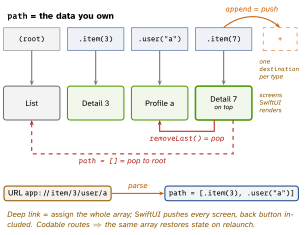
In one line: Since iOS 16 navigation is data: a NavigationStack renders a path (an
array of Hashable values) that you own; navigationDestination(for:) maps each value
type to a screen. Push = append, pop = remove, deep link = assign a whole path.
Download PDF Print view LaTeX source
How it works
NavigationStack(path: root:)(16) — the path is[Route](one type) orNavigationPath: a type-erased list ofHashablevalues, so one stack can holdItem,User,Int…, each routed by its own destination.NavigationLink(_:value:)pushes a value, not a view — lazy, decoupled, programmatic.NavigationLink { Dest() } label: {}(view-based) still works but cannot be driven from the path..navigationDestination(for: T.self) { v in … }— one per type per stack, inside the stack, on a view that is always there (not in a lazy row). iOS 17 addsnavigationDestination(item:);(isPresented:)is 16.- Programmatic: push
path.append(x); poppath.removeLast(); pop-to-rootpath = []/path.removeAll()for an array, orpath.removeLast(path.count)/path = NavigationPath()—NavigationPathhas noremoveAll. - Restoration: if every element is
Codable,path.codablegives aNavigationPath.CodableRepresentation(elsenil); encode to@SceneStorage/ disk, rebuild withNavigationPath(rep). NavigationSplitView(16) — 2 columns (sidebar,detail) or 3 (+content); selection drives the next column;columnVisibilitybinding; on compact width it collapses into a stack (preferredCompactColumn, 17).- Modals:
.sheet(card, swipe-dismiss,.presentationDetents([.medium, .large])16);.fullScreenCover(no swipe-dismiss);.popover(bubble on iPad/Mac, a sheet on compact unless.presentationCompactAdaptation, 16.4). Each takesisPresented:(Bool) oritem:(Identifiable?— preferred when content depends on data). Block swipe:.interactiveDismissDisabled(). @Environment(\.dismiss)(15) — pops the pushed view or closes the sheet/cover that presented this view: the nearest context.- Tabs: one
NavigationStackper tab, each with its own path. - Router: an
@Observableobject owningpath(+ sheet state), put in the environment, so any view callsrouter.show(.x)and.onOpenURLmaps a URL to routes.
Example — router + deep link
enum Route: Hashable, Codable { case item(Int), user(String) }
@Observable final class Router {
  var path: [Route] = []
  func open(_ url: URL) { path = Route.parse(url) } // all at once
}
struct Root: View {
  @State private var router = Router()
  var body: some View {
    NavigationStack(path: $router.path) {
      List(1..<50, id: \.self) { n in
        NavigationLink("Item \(n)", value: Route.item(n)) }
      .navigationDestination(for: Route.self) { Screen(route: $0) }
    }
    .environment(router).onOpenURL { router.open($0) }
  } }
Picture — the stack is the path
Interview traps
NavigationViewandNavigationLink(isActive:)/(tag:selection:)are deprecated (iOS 16): oneBoolper link, buggy pops, no restoration.navigationDestinationinside aList/LazyVStackrow, or two for one type — “no matching destination” or the wrong screen. Declare once, on a stable ancestor..sheet(isPresented:)+ separate@State var selected— can present stale/nildata. Use.sheet(item: $selected).dismiss()inside aNavigationStackwithin a sheet pops the inner stack, it does not close the sheet — pass a closure/binding or readdismissat sheet level..navigationTitlegoes on the content, not onNavigationStack; a split view tested only on iPad shows a blank detail when collapsed on iPhone.- Nesting a
NavigationStackin a pushed screen = two bars / broken back stack.
Remember
“Push values, not views.” Path = [Hashable]; destination = per type; item: beats isPresented:; dismiss = nearest context.
Likely questions
- Why
NavigationPath? — type-erased, heterogeneous values,Codablefor restoration. - Pop to root? —
path = [](orremoveLast(path.count)). - Deep link? — parse URL → routes → assign the path in
.onOpenURL. - Sheet vs fullScreenCover? — card + swipe-dismiss vs opaque, no swipe.
- Coordinator in SwiftUI? —
@Observablerouter owning the path, via environment.