security · memo
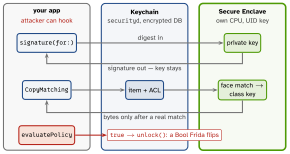
In one line: The Keychain is an encrypted database outside your
sandbox (securityd); its rows open with class keys that
depend on lock state. The Secure Enclave is a separate chip: keys
born there never leave — data in, signature out. Biometrics are
secure only when they gate a key, never when they return a Bool.
Download PDF Print view LaTeX source
Keychain
SecItemAdd·SecItemCopyMatching·SecItemUpdate·SecItemDelete— dictionary in,OSStatusout. No upsert: add, and onerrSecDuplicateItemupdate; absent →errSecItemNotFound.kSecClass:GenericPassword(tokens; identity = service + account),InternetPassword,Key,Certificate,Identity. Reads needkSecReturnData: true+kSecMatchLimit.- Sharing:
kSecAttrAccessGroup, same Team ID, group in the Keychain Sharing entitlement.kSecAttrSynchronizable= iCloud Keychain. Items usually survive uninstall — not a contract; never a “first run” flag.
kSecAttrAccessible… — choose by when you read | |
|---|---|
WhenPasscodeSetThisDeviceOnly | unlocked + passcode; deleted if the passcode is removed |
WhenUnlocked (default) | only while unlocked — UI-driven secrets |
AfterFirstUnlock | 1st unlock → reboot, also locked: background work |
…ThisDeviceOnly | never migrates (no iCloud sync, no restore to a new device) |
Secure Enclave & biometrics
- SE keys are EC P-256 (no RSA, no arbitrary blobs): generated and used inside; the app holds an opaque reference. CryptoKit
SecureEnclave.P256.Signing.PrivateKey— itsdataRepresentationis a wrapped handle only this SE can use (store it in the Keychain). No SE on the Simulator. - Protect a secret with the SE: encrypt it under an SE-bound key, or gate its item with a
SecAccessControl. - Flags:
.biometryCurrentSet(item dies when a face/finger is enrolled — an attacker adding theirs loses access),.biometryAny,.userPresence(biometry or passcode),.privateKeyUsage(SE keys). LAContext.evaluatePolicy= aBoolin hookable code: UX only. Reuse it viakSecUseAuthenticationContext(one prompt). Face ID needsNSFaceIDUsageDescription.
Example
let id: [CFString: Any] = [kSecClass: kSecClassGenericPassword,
  kSecAttrService: "api", kSecAttrAccount: "token"]
var add = id; add[kSecValueData] = data
add[kSecAttrAccessible] = kSecAttrAccessibleAfterFirstUnlock
var st = SecItemAdd(add as CFDictionary, nil)
if st == errSecDuplicateItem {                   // no upsert
  let new = [kSecValueData: data] as CFDictionary
  st = SecItemUpdate(id as CFDictionary, new) }
let acl = SecAccessControlCreateWithFlags(nil,
  kSecAttrAccessibleWhenUnlockedThisDeviceOnly,
  [.privateKeyUsage, .biometryCurrentSet], nil)!
let key = try SecureEnclave.P256.Signing
                .PrivateKey(accessControl: acl)
let sig = try key.signature(for: nonce)  // Face ID, signed in SE
Picture — the trust boundary
Data Protection — files, same idea
.complete | unlocked only; key dropped ∼10 s after lock |
.completeUnlessOpen | open files keep working when locked; new files can be created |
.completeUntilFirstUserAuthentication | default — the
twin of AfterFirstUnlock |
.none | UID-key only, always readable |
data.write(to:options: .completeFileProtection); SQLite: the -wal/-shm files too. No passcode ⇒ no
passcode-derived keys: every class degrades to .none.
Interview traps
- Background upload fails at 3 am → token is
WhenUnlocked; locked read =errSecInteractionNotAllowed. UseAfterFirstUnlock. - “Put the JWT in the Secure Enclave” — impossible; it holds keys.
if faceIDOK { showVault() }is a UI gate, not security..completeCore Data store + background launch = crash.- Tokens in
UserDefaults— a plain plist in the container. - Add succeeds, read says
errSecItemNotFound→ query differs (service/account/access group) or nokSecReturnData. …ThisDeviceOnly+kSecAttrSynchronizable— contradictory; synced items cannot be device-only.
Remember
“Keychain for secrets, class for when, enclave for keys, biometry on the key — never on a Bool.”
Likely questions
- Token for a background refresh? — Keychain,
AfterFirstUnlock(ThisDeviceOnly). - Why
.biometryCurrentSet? — re-enrolment invalidates the item. - Can the app export an SE private key? — no; only use it by reference.
- Share a login across your apps? — same team + keychain access group.