react-native · memo
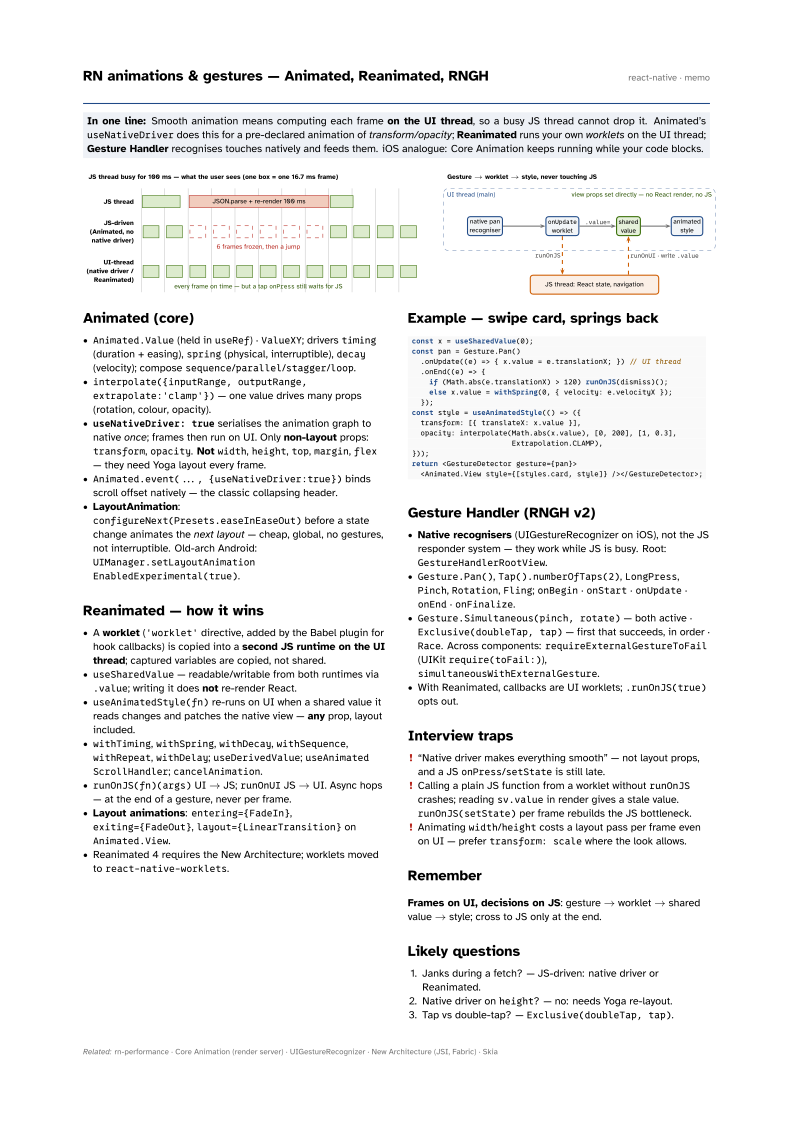
In one line: Smooth animation means computing each frame on the UI thread, so a busy JS
thread cannot drop it. Animated’s useNativeDriver does this for a pre-declared
animation of transform/opacity; Reanimated runs your own worklets on the
UI thread; Gesture Handler recognises touches natively and feeds them. iOS analogue:
Core Animation keeps running while your code blocks.
Download PDF Print view LaTeX source
Animated (core)
Animated.Value(held inuseRef) ·ValueXY; driverstiming(duration + easing),spring(physical, interruptible),decay(velocity); composesequence/parallel/stagger/loop.interpolate({inputRange, outputRange,extrapolate:'clamp'})— one value drives many props (rotation, colour, opacity).useNativeDriver: trueserialises the animation graph to native once; frames then run on UI. Only non-layout props:transform,opacity. Notwidth,height,top,margin,flex— they need Yoga layout every frame.Animated.event(..., {useNativeDriver:true})binds scroll offset natively — the classic collapsing header.- LayoutAnimation:
configureNext(Presets.easeInEaseOut)before a state change animates the next layout — cheap, global, no gestures, not interruptible. Old-arch Android:UIManager.setLayoutAnimationEnabledExperimental(true).
Reanimated — how it wins
- A worklet (
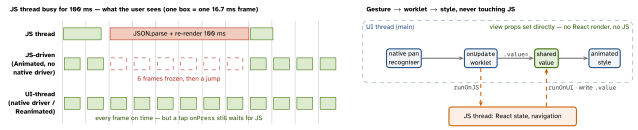
'worklet'directive, added by the Babel plugin for hook callbacks) is copied into a second JS runtime on the UI thread; captured variables are copied, not shared. useSharedValue— readable/writable from both runtimes via.value; writing it does not re-render React.useAnimatedStyle(fn)re-runs on UI when a shared value it reads changes and patches the native view — any prop, layout included.withTiming,withSpring,withDecay,withSequence,withRepeat,withDelay;useDerivedValue;useAnimatedScrollHandler;cancelAnimation.runOnJS(fn)(args)UI → JS;runOnUIJS → UI. Async hops — at the end of a gesture, never per frame.- Layout animations:
entering={FadeIn},exiting={FadeOut},layout={LinearTransition}onAnimated.View. - Reanimated 4 requires the New Architecture; worklets moved to
react-native-worklets.
Example — swipe card, springs back
const x = useSharedValue(0);
const pan = Gesture.Pan()
  .onUpdate((e) => { x.value = e.translationX; }) // UI thread
  .onEnd((e) => {
    if (Math.abs(e.translationX) > 120) runOnJS(dismiss)();
    else x.value = withSpring(0, { velocity: e.velocityX });
  });
const style = useAnimatedStyle(() => ({
  transform: [{ translateX: x.value }],
  opacity: interpolate(Math.abs(x.value), [0, 200], [1, 0.3],
                       Extrapolation.CLAMP),
}));
return <GestureDetector gesture={pan}>
  <Animated.View style={[styles.card, style]} /></GestureDetector>;
Gesture Handler (RNGH v2)
- Native recognisers (UIGestureRecognizer on iOS), not the JS responder system — they work while JS is busy. Root:
GestureHandlerRootView. Gesture.Pan(),Tap().numberOfTaps(2),LongPress,Pinch,Rotation,Fling;onBegin·onStart·onUpdate·onEnd·onFinalize.Gesture.Simultaneous(pinch, rotate)— both active ·Exclusive(doubleTap, tap)— first that succeeds, in order ·Race. Across components:requireExternalGestureToFail(UIKitrequire(toFail:)),simultaneousWithExternalGesture.- With Reanimated, callbacks are UI worklets;
.runOnJS(true)opts out.
Interview traps
- “Native driver makes everything smooth” — not layout props, and a JS
onPress/setStateis still late. - Calling a plain JS function from a worklet without
runOnJScrashes; readingsv.valuein render gives a stale value.runOnJS(setState)per frame rebuilds the JS bottleneck. - Animating
width/heightcosts a layout pass per frame even on UI — prefertransform: scalewhere the look allows.
Remember
Frames on UI, decisions on JS: gesture → worklet → shared value → style; cross to JS only at the end.
Likely questions
- Janks during a fetch? — JS-driven: native driver or Reanimated.
- Native driver on
height? — no: needs Yoga re-layout. - Tap vs double-tap? —
Exclusive(doubleTap, tap).