ios-swift · memo
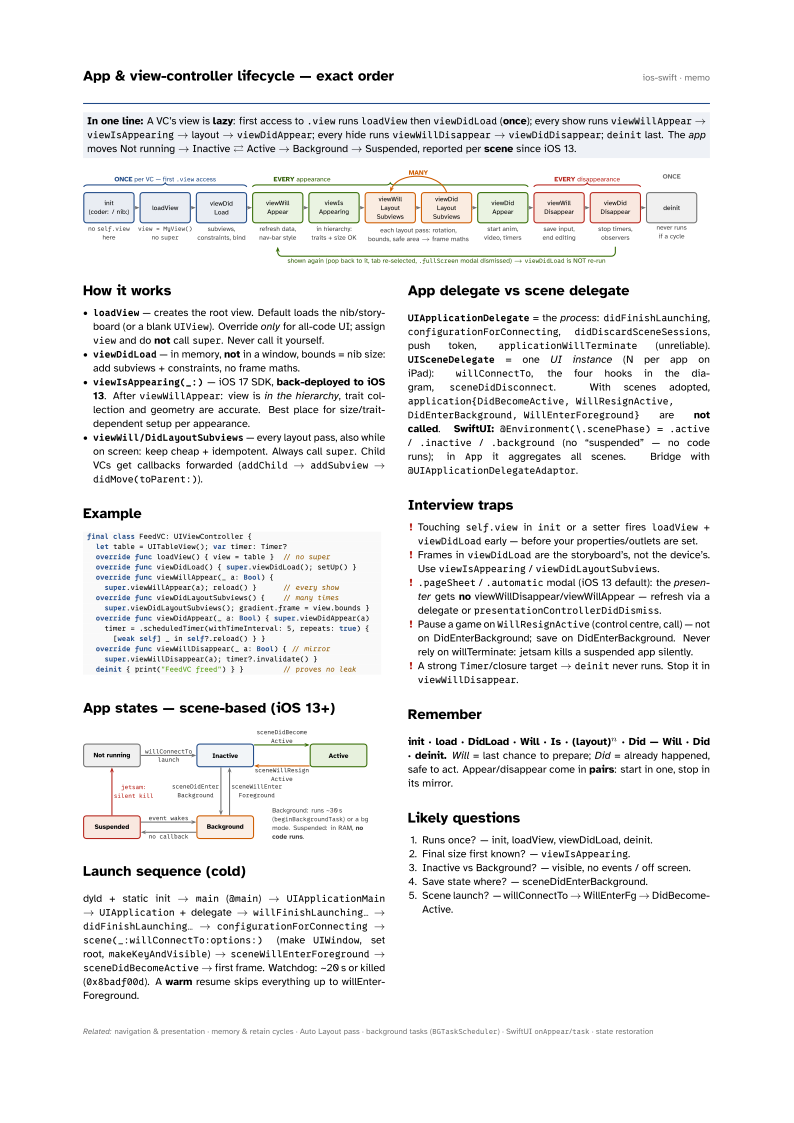
In one line: A VC’s view is lazy: first access to .view runs
loadView then viewDidLoad (once); every show runs
viewWillAppear → viewIsAppearing → layout → viewDidAppear; every
hide runs viewWillDisappear → viewDidDisappear; deinit last.
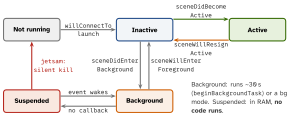
The app moves Not running → Inactive ⇄ Active → Background → Suspended, reported
per scene since iOS 13.
Download PDF Print view LaTeX source

How it works
loadView— creates the root view. Default loads the nib/storyboard (or a blankUIView). Override only for all-code UI; assignviewand do not callsuper. Never call it yourself.viewDidLoad— in memory, not in a window, bounds = nib size: add subviews + constraints, no frame maths.viewIsAppearing(_:)— iOS 17 SDK, back-deployed to iOS 13. AfterviewWillAppear: view is in the hierarchy, trait collection and geometry are accurate. Best place for size/trait-dependent setup per appearance.viewWill/DidLayoutSubviews— every layout pass, also while on screen: keep cheap + idempotent. Always callsuper. Child VCs get callbacks forwarded (addChild→addSubview→didMove(toParent:)).
Example
final class FeedVC: UIViewController {
  let table = UITableView(); var timer: Timer?
  override func loadView() { view = table }  // no super
  override func viewDidLoad() { super.viewDidLoad(); setUp() }
  override func viewWillAppear(_ a: Bool) {
    super.viewWillAppear(a); reload() }      // every show
  override func viewDidLayoutSubviews() {    // many times
    super.viewDidLayoutSubviews(); gradient.frame = view.bounds }
  override func viewDidAppear(_ a: Bool) { super.viewDidAppear(a)
    timer = .scheduledTimer(withTimeInterval: 5, repeats: true) {
      [weak self] _ in self?.reload() } }
  override func viewWillDisappear(_ a: Bool) { // mirror
    super.viewWillDisappear(a); timer?.invalidate() }
  deinit { print("FeedVC freed") } }         // proves no leak
App states — scene-based (iOS 13+)
Launch sequence (cold)
dyld + static init → main (@main) → UIApplicationMain → UIApplication + delegate → willFinishLaunching… → didFinishLaunching… → configurationForConnecting → scene(_:willConnectTo:options:) (make UIWindow, set root, makeKeyAndVisible) → sceneWillEnterForeground → sceneDidBecomeActive → first frame. Watchdog: ~20 s or killed (0x8badf00d). A warm resume skips everything up to willEnterForeground.
App delegate vs scene delegate
UIApplicationDelegate = the process: didFinishLaunching, configurationForConnecting, didDiscardSceneSessions, push token, applicationWillTerminate (unreliable). UISceneDelegate = one UI instance (N per app on iPad): willConnectTo, the four hooks in the diagram, sceneDidDisconnect. With scenes adopted, application{DidBecomeActive, WillResignActive, DidEnterBackground,
WillEnterForeground} are not called. SwiftUI: @Environment(\.scenePhase) = .active / .inactive / .background (no “suspended” — no code runs); in App it aggregates all scenes. Bridge with @UIApplicationDelegateAdaptor.
Interview traps
- Touching
self.viewininitor a setter firesloadView+viewDidLoadearly — before your properties/outlets are set. - Frames in
viewDidLoadare the storyboard’s, not the device’s. UseviewIsAppearing/viewDidLayoutSubviews. .pageSheet/.automaticmodal (iOS 13 default): the presenter gets no viewWillDisappear/viewWillAppear — refresh via a delegate orpresentationControllerDidDismiss.- Pause a game on
WillResignActive(control centre, call) — not on DidEnterBackground; save on DidEnterBackground. Never rely on willTerminate: jetsam kills a suspended app silently. - A strong
Timer/closure target →deinitnever runs. Stop it inviewWillDisappear.
Remember
init · load · DidLoad · Will · Is · (layout)n · Did — Will · Did · deinit. Will = last chance to prepare; Did = already happened, safe to act. Appear/disappear come in pairs: start in one, stop in its mirror.
Likely questions
- Runs once? — init, loadView, viewDidLoad, deinit.
- Final size first known? —
viewIsAppearing. - Inactive vs Background? — visible, no events / off screen.
- Save state where? — sceneDidEnterBackground.
- Scene launch? — willConnectTo → WillEnterFg → DidBecomeActive.