ios-platform · memo
In one line: Accessibility: VoiceOver walks a tree of elements and speaks each one’s label, value, traits, hint; text must scale with Dynamic Type; honour user settings (Reduce Motion, contrast). Localization: every user-visible string is a whole sentence in a String Catalog, arguments are positional, plurals follow CLDR rules, layout is leading/trailing, and numbers/dates go through formatters.
Download PDF Print view LaTeX source
How it works — accessibility
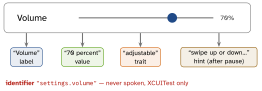
- Label = what it is (“Volume” — never “Volume button”, the trait says button). Value = current state (“70%”). Traits = role/state (
.button .header .selected
 .adjustable .notEnabled
). Hint = result of acting, spoken last, user can turn hints off. isAccessibilityElement = truemakes a view a leaf; on a container it hides the children. Order children withaccessibilityElements = [...]. Decorative:.accessibilityHidden(true).- Grouping (SwiftUI):
.accessibilityElement(children:).combine(one swipe, merged) ·.ignore(you label it) ·.contain(keep children, group them). .adjustableneedsaccessibilityIncrement()/Decrement()(SwiftUI.accessibilityAdjustableAction).- Custom actions (
UIAccessibilityCustomAction,.accessibilityAction(named:)) expose swipe/long-press actions via the Actions rotor; custom rotors (.accessibilityRotor) jump between headings/links. Announce:UIAccessibility.post(notification: .announcement, …). accessibilityIdentifieris for UI tests: stable, not localized, never spoken.- Dynamic Type:
UIFont.preferredFont(forTextStyle:)orUIFontMetrics(forTextStyle:).scaledFont(for:)+adjustsFontForContentSizeCategory = true(defaultfalse) +numberOfLines = 0. SwiftUI text styles scale by themselves;@ScaledMetric. AX sizes → stack vertically. - Settings: Reduce Motion (
\.accessibilityReduceMotion: swap zoom for fades), Reduce Transparency, Increase Contrast, Bold Text. Contrast ≥ 4.5:1 (3:1 large text); never colour alone. - Targets ≥ 44×44 pt. Audit: Accessibility
Inspector +
XCUIApplication().performAccessibilityAudit()(iOS 17).
How it works — localization
- String Catalog
.xcstrings(Xcode 15, JSON): keys extracted at build, per-language state, plural + device variants inline. Replaces.strings+.stringsdict. - Code:
String(localized: "key", defaultValue:, comment:)(iOS 15),LocalizedStringResource; SwiftUIText("literal")is aLocalizedStringKey. Packages:bundle: .module. Always acomment:. - Plurals: “Vary by plural” — categories
zero one two few many otherper language (Polish: one / few / many). Nevercount == 1 ? :. - RTL:
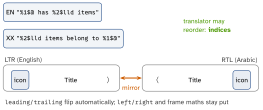
leading/trailing+.naturalalignment mirror;left/rightnever do. Opt out per view withsemanticContentAttribute(.playbackfor media controls); SwiftUI\.layoutDirection. - Formatters:
date.formatted(…),.currency(code:),Measurement(km↔mi).Locale.current= format region, not UI language. - Test: pseudolanguages (Accented, Bounded, Double-Length, RTL); vendors get Export Localizations (
.xcloc/XLIFF).
Example
HStack {                           // a volume row
  Image(systemName: "speaker.wave.2").accessibilityHidden(true)
  Text("Volume")                   // LocalizedStringKey
  Slider(value: $level)
}
.accessibilityElement(children: .ignore)
.accessibilityLabel("Volume")      // no "slider" - trait adds it
.accessibilityValue(Text(level, format: .percent))
.accessibilityAdjustableAction {   // swipe up / down
  level += $0 == .increment ? 0.1 : -0.1 }
.accessibilityIdentifier("settings.volume")   // tests only
// catalog key "%lld files deleted", varied by plural
let msg = String(localized: "\(count) files deleted",
                 comment: "Toast after bulk delete")
Picture — what VoiceOver says
Picture — positional arguments & mirroring
Interview traps
- “Play button” as label → “Play button, button”.
isAccessibilityElementon a container hides its children.preferredFontwithout theadjustsFont…flag → never re-scales.- UI tests matching localized labels — use
accessibilityIdentifier. "\(n) " + "items"— breaks word order and plurals.Text(aStringVar)is not localized — only literals / keys.
Remember
“L-V-T-H” — Label, Value, Trait, Hint (the order VoiceOver speaks). Localize sentences, not words; lead, don’t left.
Likely questions
- Label vs identifier? — spoken + localized vs silent test hook.
- Scale a custom font? —
UIFontMetricsscaledFont(for:). - Why
%1$@? — lets translators reorder arguments. - Catch truncation / hard-coded text early? — pseudolanguages.
- Swipe-to-delete for VoiceOver? — accessibility custom action.