dev-tools · memo
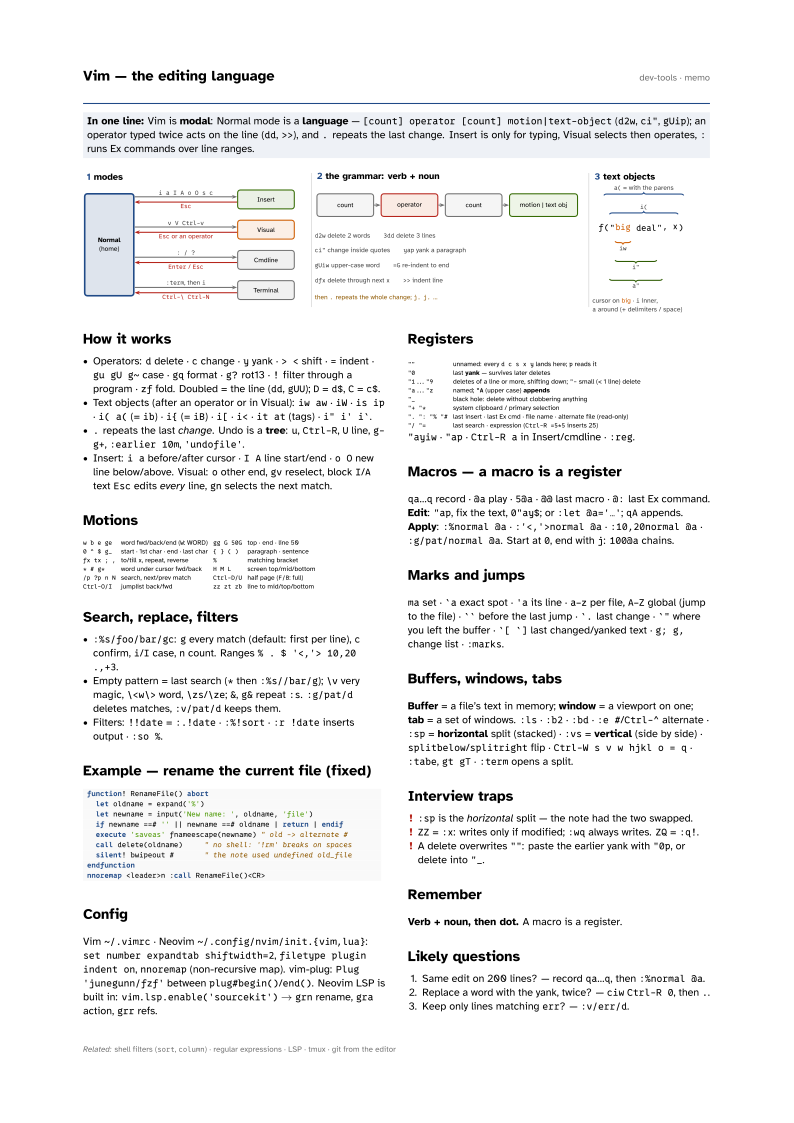
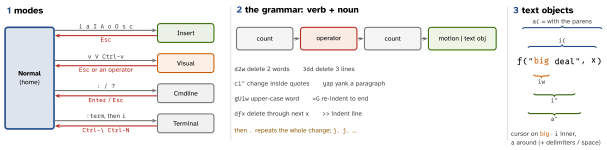
In one line: Vim is modal: Normal mode is a language —
[count] operator [count] motion|text-object (d2w, ci", gUip);
an operator typed twice acts on the line (dd, >>), and . repeats
the last change. Insert is only for typing, Visual selects then operates, : runs Ex
commands over line ranges.
Download PDF Print view LaTeX source
How it works
- Operators:
ddelete ·cchange ·yyank ·> <shift ·=indent ·gu gU g~case ·gqformat ·g?rot13 ·!filter through a program ·zffold. Doubled = the line (dd,gUU);D=d$,C=c$. - Text objects (after an operator or in Visual):
iw aw·iW·is ip·i( a((=ib) ·i{(=iB) ·i[·i<·it at(tags) ·i" i' i`. .repeats the last change. Undo is a tree:u,Ctrl-R,Uline,g- g+,:earlier 10m,'undofile'.- Insert:
i abefore/after cursor ·I Aline start/end ·o Onew line below/above. Visual:oother end,gvreselect, blockI/AtextEscedits every line,gnselects the next match.
Motions
w b e ge | word fwd/back/end (W: WORD) | gg G 50G | top · end · line 50 |
0 ^ $ g_ | start · 1st char · end · last char | { } ( ) | paragraph · sentence |
fx tx ; , | to/till x, repeat, reverse | % | matching bracket |
* # g* | word under cursor fwd/back | H M L | screen top/mid/bottom |
/p ?p n N | search, next/prev match | Ctrl-D/U | half page (F/B: full) |
Ctrl-O/I | jumplist back/fwd | zz zt zb | line to mid/top/bottom |
Search, replace, filters
:%s/foo/bar/gc:gevery match (default: first per line),cconfirm,i/Icase,ncount. Ranges% . $ '<,'> 10,20 .,+3.- Empty pattern = last search (
*then:%s//bar/g);\vvery magic,\<w\>word,\zs/\ze;&,g&repeat:s.:g/pat/ddeletes matches,:v/pat/dkeeps them. - Filters:
!!date=:.!date·:%!sort·:r !dateinserts output ·:so %.
Example — rename the current file (fixed)
function! RenameFile() abort
  let oldname = expand('%')
  let newname = input('New name: ', oldname, 'file')
  if newname ==# '' || newname ==# oldname | return | endif
  execute 'saveas' fnameescape(newname) " old -> alternate #
  call delete(oldname)     " no shell: '!rm' breaks on spaces
  silent! bwipeout #       " the note used undefined old_file
endfunction
nnoremap <leader>n :call RenameFile()<CR>
Config
Vim ~/.vimrc · Neovim ~/.config/nvim/init.{vim,lua}: set number expandtab
shiftwidth=2, filetype plugin indent on, nnoremap (non-recursive map). vim-plug: Plug 'junegunn/fzf' between plug#begin()/end(). Neovim LSP is built in: vim.lsp.enable('sourcekit') → grn rename, gra action, grr refs.
Registers
"" | unnamed: every d c s x y lands here; p reads it |
"0 | last yank — survives later deletes |
"1..."9 | deletes of a line or more, shifting down; "- small (< 1 line) delete |
"a..."z | named; "A (upper case) appends |
"_ | black hole: delete without clobbering anything |
"+ "* | system clipboard / primary selection |
". ": "% "# | last insert · last Ex cmd · file name · alternate file (read-only) |
"/ "= | last search · expression (Ctrl-R =5*5 inserts 25) |
[1pt]
"ayiw · "ap · Ctrl-R a in Insert/cmdline · :reg.
Macros — a macro is a register
qa…q record · @a play · 5@a · @@ last macro · @: last Ex command. Edit: "ap, fix the text, 0"ay$; or :let @a='…'; qA appends. Apply: :%normal @a · :'<,'>normal @a · :10,20normal @a · :g/pat/normal @a. Start at 0, end with j: 100@a chains.
Marks and jumps
ma set · `a exact spot · 'a its line · a–z per file, A–Z global (jump to the file) · `` before the last jump · `. last change · `" where you left the buffer · `[ `] last changed/yanked text · g; g, change list · :marks.
Buffers, windows, tabs
Buffer = a file’s text in memory; window = a viewport on one; tab = a set of windows. :ls · :b2 · :bd · :e #/Ctrl-^ alternate · :sp = horizontal split (stacked) · :vs = vertical (side by side) · splitbelow/splitright flip · Ctrl-W s v w hjkl o = q · :tabe, gt gT · :term opens a split.
Interview traps
:spis the horizontal split — the note had the two swapped.ZZ=:x: writes only if modified;:wqalways writes.ZQ=:q!.- A delete overwrites
"": paste the earlier yank with"0p, or delete into"_.
Remember
Verb + noun, then dot. A macro is a register.
Likely questions
- Same edit on 200 lines? — record
qa…q, then:%normal @a. - Replace a word with the yank, twice? —
ciwCtrl-R 0, then.. - Keep only lines matching
err? —:v/err/d.