ai · memo
In one line: An agent (Claude Code, Codex, Cursor, Copilot, Xcode’s coding assistant) drafts and executes; you stay accountable for every line that ships. The senior skill is not prompting — it is specifying the task, constraining the context, and verifying each small change with the compiler, the tests, the running app and Instruments. Speed comes from short verified loops, not big generated diffs.
Download PDF Print view LaTeX source
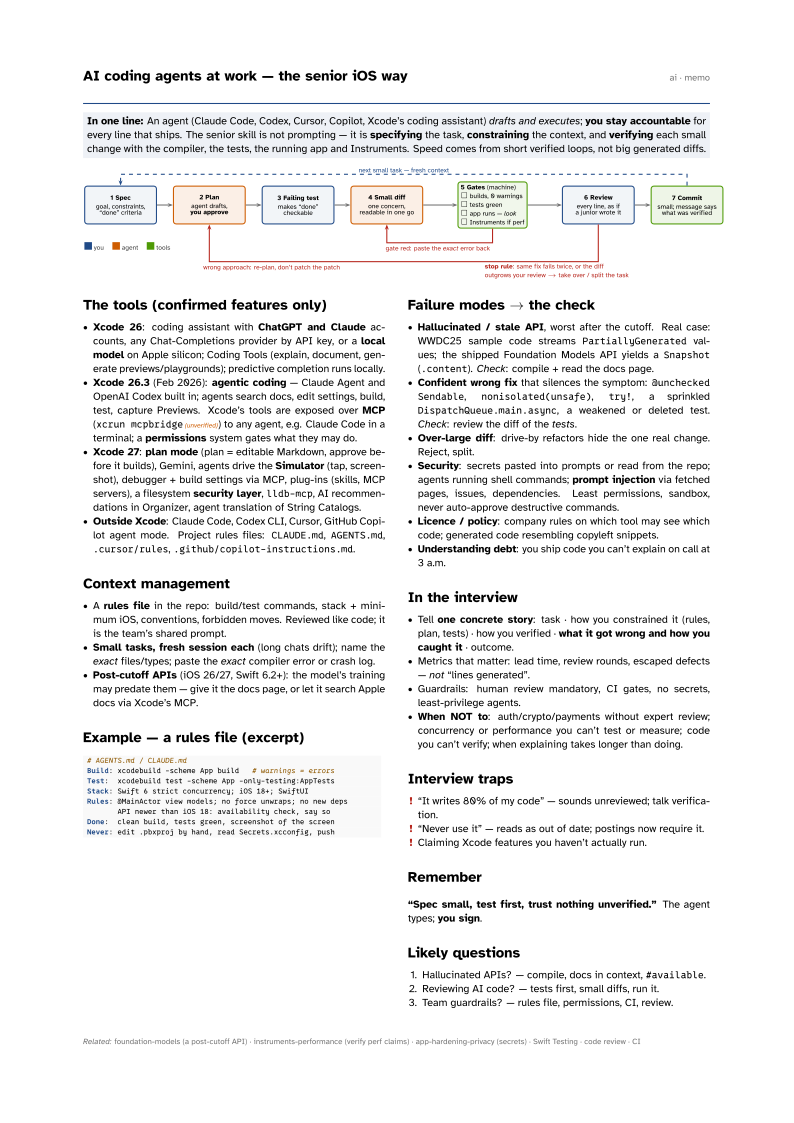

The tools (confirmed features only)
- Xcode 26: coding assistant with ChatGPT and Claude accounts, any Chat-Completions provider by API key, or a local model on Apple silicon; Coding Tools (explain, document, generate previews/playgrounds); predictive completion runs locally.
- Xcode 26.3 (Feb 2026): agentic coding — Claude Agent and OpenAI Codex built in; agents search docs, edit settings, build, test, capture Previews. Xcode’s tools are exposed over MCP (
xcrun mcpbridge(unverified)) to any agent, e.g. Claude Code in a terminal; a permissions system gates what they may do. - Xcode 27: plan mode (plan = editable Markdown, approve before it builds), Gemini, agents drive the Simulator (tap, screenshot), debugger + build settings via MCP, plug-ins (skills, MCP servers), a filesystem security layer,
lldb-mcp, AI recommendations in Organizer, agent translation of String Catalogs. - Outside Xcode: Claude Code, Codex CLI, Cursor, GitHub Copilot agent mode. Project rules files:
CLAUDE.md,AGENTS.md,.cursor/rules,.github/copilot-instructions.md.
Context management
- A rules file in the repo: build/test commands, stack + minimum iOS, conventions, forbidden moves. Reviewed like code; it is the team’s shared prompt.
- Small tasks, fresh session each (long chats drift); name the exact files/types; paste the exact compiler error or crash log.
- Post-cutoff APIs (iOS 26/27, Swift 6.2+): the model’s training may predate them — give it the docs page, or let it search Apple docs via Xcode’s MCP.
Example — a rules file (excerpt)
# AGENTS.md / CLAUDE.md
Build: xcodebuild -scheme App build   # warnings = errors
Test:  xcodebuild test -scheme App -only-testing:AppTests
Stack: Swift 6 strict concurrency; iOS 18+; SwiftUI
Rules: @MainActor view models; no force unwraps; no new deps
       API newer than iOS 18: availability check, say so
Done:  clean build, tests green, screenshot of the screen
Never: edit .pbxproj by hand, read Secrets.xcconfig, push
Failure modes → the check
- Hallucinated / stale API, worst after the cutoff. Real case: WWDC25 sample code streams
PartiallyGeneratedvalues; the shipped Foundation Models API yields aSnapshot(.content). Check: compile + read the docs page. - Confident wrong fix that silences the symptom:
@unchecked Sendable,nonisolated(unsafe),try!, a sprinkledDispatchQueue.main.async, a weakened or deleted test. Check: review the diff of the tests. - Over-large diff: drive-by refactors hide the one real change. Reject, split.
- Security: secrets pasted into prompts or read from the repo; agents running shell commands; prompt injection via fetched pages, issues, dependencies. Least permissions, sandbox, never auto-approve destructive commands.
- Licence / policy: company rules on which tool may see which code; generated code resembling copyleft snippets.
- Understanding debt: you ship code you can’t explain on call at 3 a.m.
In the interview
- Tell one concrete story: task · how you constrained it (rules, plan, tests) · how you verified · what it got wrong and how you caught it · outcome.
- Metrics that matter: lead time, review rounds, escaped defects — not “lines generated”.
- Guardrails: human review mandatory, CI gates, no secrets, least-privilege agents.
- When NOT to: auth/crypto/payments without expert review; concurrency or performance you can’t test or measure; code you can’t verify; when explaining takes longer than doing.
Interview traps
- “It writes 80% of my code” — sounds unreviewed; talk verification.
- “Never use it” — reads as out of date; postings now require it.
- Claiming Xcode features you haven’t actually run.
Remember
“Spec small, test first, trust nothing unverified.” The agent types; you sign.
Likely questions
- Hallucinated APIs? — compile, docs in context,
#available. - Reviewing AI code? — tests first, small diffs, run it.
- Team guardrails? — rules file, permissions, CI, review.